LiveryLab Evo logo Loading ...

Free livery toolkit for Assetto Corsa EVO

Build and manage your custom AC EVO liveries.

A free Windows app for Assetto Corsa EVO creators: create custom liveries, manage local projects, preview cars in 3D and export ready-to-share packages.

One app Create liveries, drivers, tyre brands and custom grids.
Game-aware Built around your AC EVO folder, supported cars and local content.
Live preview Check livery changes directly on the car with the built-in 3D view.
Package-ready Export, import, backup and transfer your work when needed.

Feature set

Everything you need for your AC EVO livery workflow.

01

Livery Creator

Create new livery projects, manage source textures and prepare game-ready files for AC EVO.

02

My Liveries

Keep your local liveries organized, check their status and activate compatible skins when you need them.

03

Layer Studio

Use the beta layer editor to place PNG assets, shapes, stripes and text on livery textures with guides, alignment tools and 3D preview updates.

04

Driver Profiles

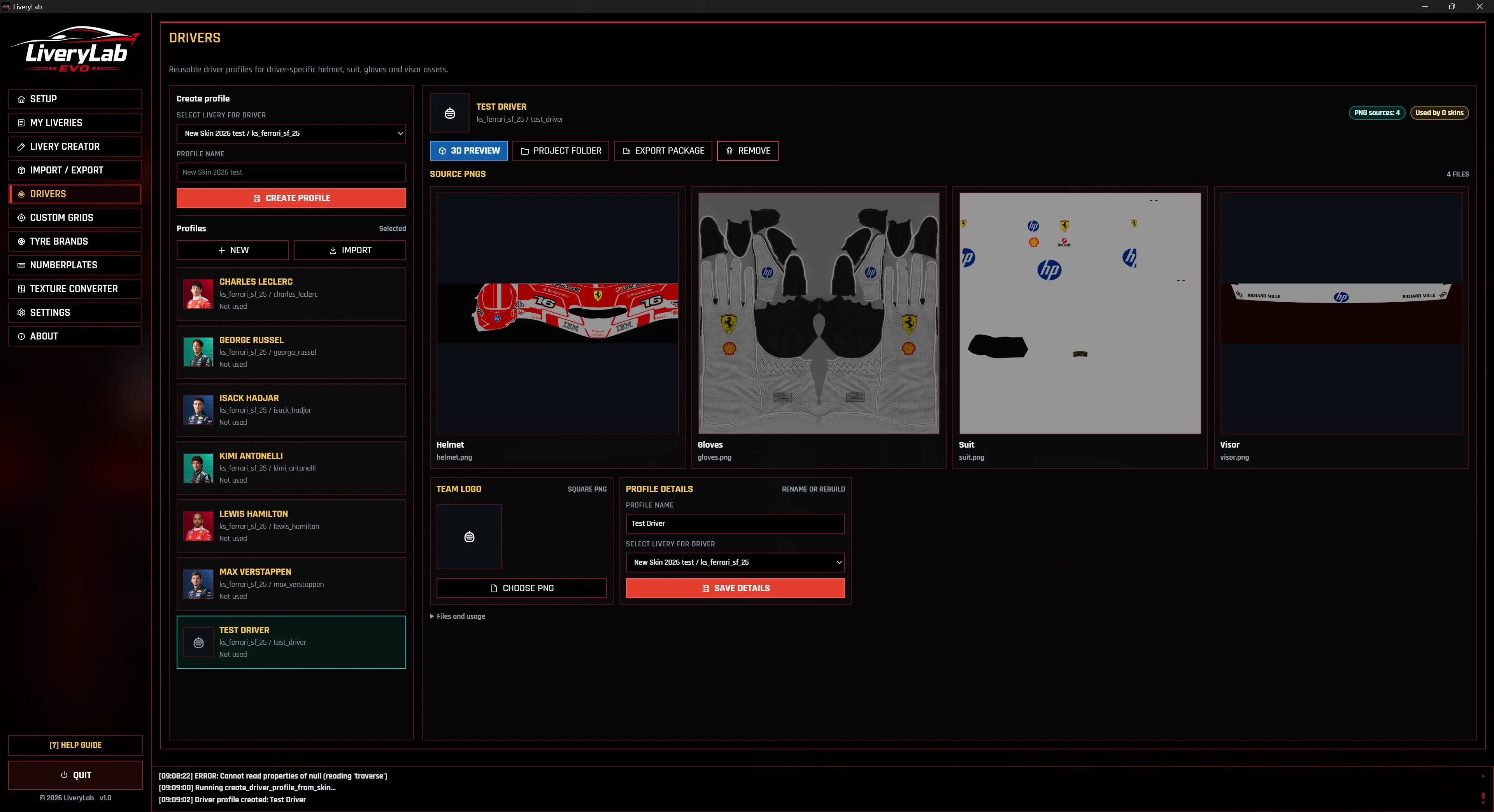
Build custom driver packages with helmets, suits, gloves, preview images and linked liveries.

05

Custom Grids

Build custom race grids with selected cars, skins, driver names and AI vehicle specs.

06

Numberplate Studio

Design numberplate templates and export ready-to-use PNG variants for supported car workflows.

07

Tyre Brands

Create and manage custom tyre brands as reusable items for your livery projects.

08

Backup & Transfer

Export and import settings, libraries and project packages using structured ZIP bundles.

Workflow

From project files to in-game updates.

LiveryLab keeps your livery workflow structured: select your AC EVO folder, extract content package, create or import a project, edit your assets, preview the result and activate your updates when everything is ready.

  1. 01

    Set up the game root

    Point LiveryLab to your Assetto Corsa EVO installation so it can detect supported cars, folders and content.

  2. 02

    Create or import

    Start a new livery project, import an existing package or reuse library items like drivers, numberplates and tyre brands.

  3. 03

    Preview and refine

    Check your livery directly on the car with the built-in 3D preview, including automatic updates while you edit. Review textures and linked assets before applying changes to the game.

  4. 04

    Activate and share

    Activate your changes in AC EVO, export ZIP packages or move your setup with Backup & Transfer.

Built for focused editing

A closer look inside LiveryLab.

The screenshot gallery gives you a quick look at the core app areas, including project setup, livery editing, live 3D preview, numberplate tools, custom grids and transfer options.

Setup Document root, Package extractor, Car analysis
My Liveries Track previews, update states and game sync.
Help Guide Screen-specific guidance for each workflow.
3D Live Preview Built-in 3D preview, including automatic updates while you edit
Livery Creator Create custom skin projects and source assets.
Driver Profiles Build reusable helmets, suits and driver assets.
Driver Asset 3D Preview Live 3D checks for helmets, suits and gloves.
Custom Grids Prepare race presets with skins and driver names.
Numberplate Studio Design template-based numberplate graphics.
Tyre Brands Manage reusable tyre branding assets.
Backup & Transfer Move libraries, settings and packages safely.
Texture Converter Convert texture sources through the app pipeline.

FAQ

Common questions before you start.

A quick overview of how LiveryLab fits into your AC EVO workflow, where it stores your work and how sharing custom content is intended to work.

Is LiveryLab free?

Yes. LiveryLab is planned as a free community tool for Assetto Corsa EVO creators, with no account, launcher, or subscription required.

Does LiveryLab modify my game files?

Only when you explicitly activate a livery or grid for the game. Until then, LiveryLab works from its own local data. Any writes to the game folder are checked and use backup-aware workflows where needed.

Why does LiveryLab need content.kspkg to be extracted?

Assetto Corsa EVO normally stores its content inside content.kspkg. After extraction, the game can use the unpacked content folder structure instead. This gives LiveryLab access to the real car, skin, material, and texture folders it needs to place activated liveries and related files correctly.

Can I share my liveries with others?

Yes. LiveryLab includes export and import workflows for structured ZIP packages, so liveries, driver profiles, tyre brands, and related project files can be moved or shared easily. Exported packages are designed for distribution, so creators can share finished liveries without handing over their editable project files.

Where does LiveryLab store my projects?

Editable projects, imported packages, and reusable library items are stored inside the LiveryLab folder structure, separate from the Assetto Corsa EVO installation. The game folder only receives the files needed for activated content.

What about write permissions and Windows SmartScreen?

If Assetto Corsa EVO is installed inside Program Files, Windows may require elevated permissions when LiveryLab activates files in the game folder. On first launch, Windows SmartScreen may also show a warning because LiveryLab is a community-built app and may not yet have an established signing reputation.

What is not possible with LiveryLab?

LiveryLab is not a general modding toolkit. It does not add new cars, change physics, modify tracks, convert track assets, provide gameplay hacks, or include mesh editing workflows. The app stays focused on livery creation, local livery management, supported presentation assets, package import/export, previews, and custom grid workflows for Assetto Corsa EVO.

Download

Get LiveryLab for Windows.

LiveryLab is a free community tool built around creating liveries for AC EVO. Download the latest Windows release of your choice, install or extract and run the app locally and offline. No account, no launcher and no subscription required.

View changelog

v0.99.98

  • Added Layer Studio PNG mask groups so polygon masks can clip PNG layers, stay selectable in the 2D texture view and bake correctly into the preview texture.
  • Improved Layer Studio layer and PNG-library reordering with pointer-based drag handling for faster drops and more responsive grouping workflows.
  • Expanded Layer Studio layer-list polish with colored group backgrounds and direct fill swatches for rectangle and ellipse layers.
  • Reworked polygon and stripe Bezier editing toward a Photoshop-style workflow with selected-point handles, coupled handle movement, Alt decoupling and Shift snapping.
  • Added curve-hover point insertion for polygon and stripe layers, including click-to-add linear points, drag-to-add Bezier points, clearer hover states and updated shortcuts guidance.

v0.99.97

  • Added selectable Custom Rear Plate handling for road-car liveries, including project plate_r.png creation, update detection and AC EVO default cleanup.
  • Fixed road-plate activation and restore cleanup for wrapped garage SavedCars so stale generated plate parts are removed safely.
  • Improved My Liveries package import/export and Backup & Transfer so read-only skins, project liveries, Layer Studio projects and required PNG assets round-trip more reliably.
  • Fixed livery creation cleanup and texture conversion handling so failed creates remove partial files and cars with non-BC1 source maps can still be generated.
  • Polished release packaging with visible third-party notices, bundled texconv documentation and font license files while removing generated build/checksum metadata from release outputs.

v0.99.96

  • Added livery-specific rear road-car plate handling so supported road skins get an editable plate_r.png project texture that is wired back into the in-game PLATE_R part during activation.
  • Fixed road plate source detection for JDM cars such as the Datsun 240Z and Toyota Supra MkIV so project PNGs come from the material-referenced plate texture instead of stale family fallback textures.
  • Improved road plate activation syncing by patching matching car final states and saved garage cars through additional skin references.
  • Moved Layer Studio base textures into per-surface layer-studio/<texture>/base.png folders with legacy migration.
  • Added a dev-mode numberplate placement helper for direct in-game smoke tests.

v0.99.95

  • Added Bezier curve editing for Layer Studio polygon layers while preserving existing straight polygon shapes.
  • Improved Layer Studio point editing with active selection frames, anchored color pickers and clickable color swatches for polygon and stripe layers.
  • Added bundled Layer Studio Google Font presets with local licenses and alphabetized font groups.
  • Improved PNG placement by closing the PNG library after inserting an asset.
  • Added 45-degree Shift rotation snapping for simple Layer Studio layers such as PNGs, shapes and text.

v0.99.94

  • Added Bezier curve editing for Layer Studio stripe layers, including click-drag curve creation and editable handles.
  • Improved Layer Studio polygon and stripe drafting with visible points, first-point polygon closing and clearer gold draft guides.
  • Added Shift snapping for stripe points and Bezier handles so edited curves can align cleanly to common angles.
  • Improved Layer Studio 3D UV mesh preview handling so body and banner UV overlays stay matched to their own texture surfaces.
  • Polished the Layer Studio shortcuts modal for the expanded editing workflow.

Community download

N24h 2026 livery pack.

A small Nurburgring 24h 2026 inspired livery collection for AC EVO I have created. The entries below show the first prepared release batch with matching preview images and download slots.

Verstappen Racing #3

Mercedes-AMG GT2

Driver

Max Verstappen, Lucas Auer, Jules Gounon, Daniel Juncadella

Download

Kondo Racing #45

Ferrari 296 GT3

Driver

David Perel, Dennis Marschall, Thierry Vermeulen, Thomas Neubauer

Download

HRT Ford Racing #67

Ford Mustang GT3

Driver

Dennis Olsen, Christopher Mies, Frederic Vervisch, Frank Stippler

Download

Schubert Motorsport #77

BMW M4 GT3 Evo

Driver

Marco Wittmann, Philipp Eng, Charles Weerts, Robin Frijns

Download

Team LIQUI MOLY #902

Porsche 911 GT3 Cup

Driver

Ryan Harrison, Noah Nagelsdiek, Raphael Rennhofer, Leon Wassertheurer

Download

Muehlner Motorsport #904

Porsche 911 GT3 Cup

Driver

Antal Zsigo, Adam Benko, Csaba Walter, Moritz Kranz

Download

Huber Motorsport #925

Porsche 911 GT3 Cup

Driver

Jon Miller, Jaden Lander, Christopher Allen, Hans Wehrmann

Download

Complete set

N24 2026 Livery Pack

Download all seven N24 2026 liveries as one prepared package.

Includes 7 liveries
Download all

Template set

Tyre Brand Pack

A compact set of reusable LiveryLab tyre brand templates for your own projects.

Reusable tyre brand templates
Download tyre brands

Project facts

HTML/CSS 0 lines of app source
JavaScript 0 lines of app source
Python 0 lines of app source
Git commits 0 commits in this repository
About the Creator

Made by someone who actually uses it.

Online, you may know me as Mikesch or Blumenstein, but my real name is Marvin.

I started creating custom liveries more than 20 years ago with GTR 2 by SimBin, inspired by endurance racing and the Nürburgring 24h. Since then, sim racing and livery design have always been part of my hobby and creative work. I also created several Nürburgring 24h livery packs for Automobilista 2, which you can download on OverTake.gg.

With more than two decades of experience as a graphic designer and frontend developer, LiveryLab brings both sides together: visual design and practical tooling.

With Assetto Corsa EVO currently in Early Access, I’m especially excited about its focus on the Nordschleife and the planned open-world environment around the area. I have high hopes for this title, and that excitement led me to create LiveryLab: a free community tool that gives AC EVO creators something useful to work with while we wait for 1.0.

The app focuses on clean file handling, useful workflows, and the small details that make a custom skin feel finished. It is also my first real full-scale app project, and building it has been a huge learning experience for me.

If you like LiveryLab and want to support the project, feel free to buy me a coffee: Paypal.me

Thanks for your support,
Marvin/mikesch_thecat/Blumenstein

Join Discord